NEU Cloud-Sync & Portfolio-Optimizer sind da

FX Monitor Studio Testen. Analysieren. Optimieren.

FX Monitor Studio - das Desktop-Kraftpaket für Strategietests in MT4 & MT5 — Backtests ausführen, jeden Trade sezieren, Portfolios bauen und alles mit Ihrem FX Monitor Konto synchronisieren.

v0.2.6 · Windows 10/11 · x64 Kostenlos mit Ihrem FX Monitor Konto Funktioniert mit jedem MT5-Build
FX Monitor Studio
Alles in einer App

Vom Rohbericht zur Entscheidung.

Analytik und ein MT5-Tester-Launcher, verschmolzen zu einem nativen Desktop-Tool.

Integrierter MT5-Tester-Launcher

Symbol, Zeitraum, Modell und Eingaben konfigurieren, den Strategietester starten und den Bericht automatisch zurückholen — kein manueller Export.

Dukascopy History Loader

Laden Sie jahrelange Dukascopy-Historie herunter und machen Sie daraus einsatzbereite MT5-Custom-Symbole — direkt aus der App, ohne manuelles Hantieren mit Dateien.

Claude Code Integration

Studio klinkt sich in Claude Code ein — bauen Sie Portfolios und analysieren Sie Backtests mit KI direkt aus der Claude Code CLI.

Tiefe Analytik

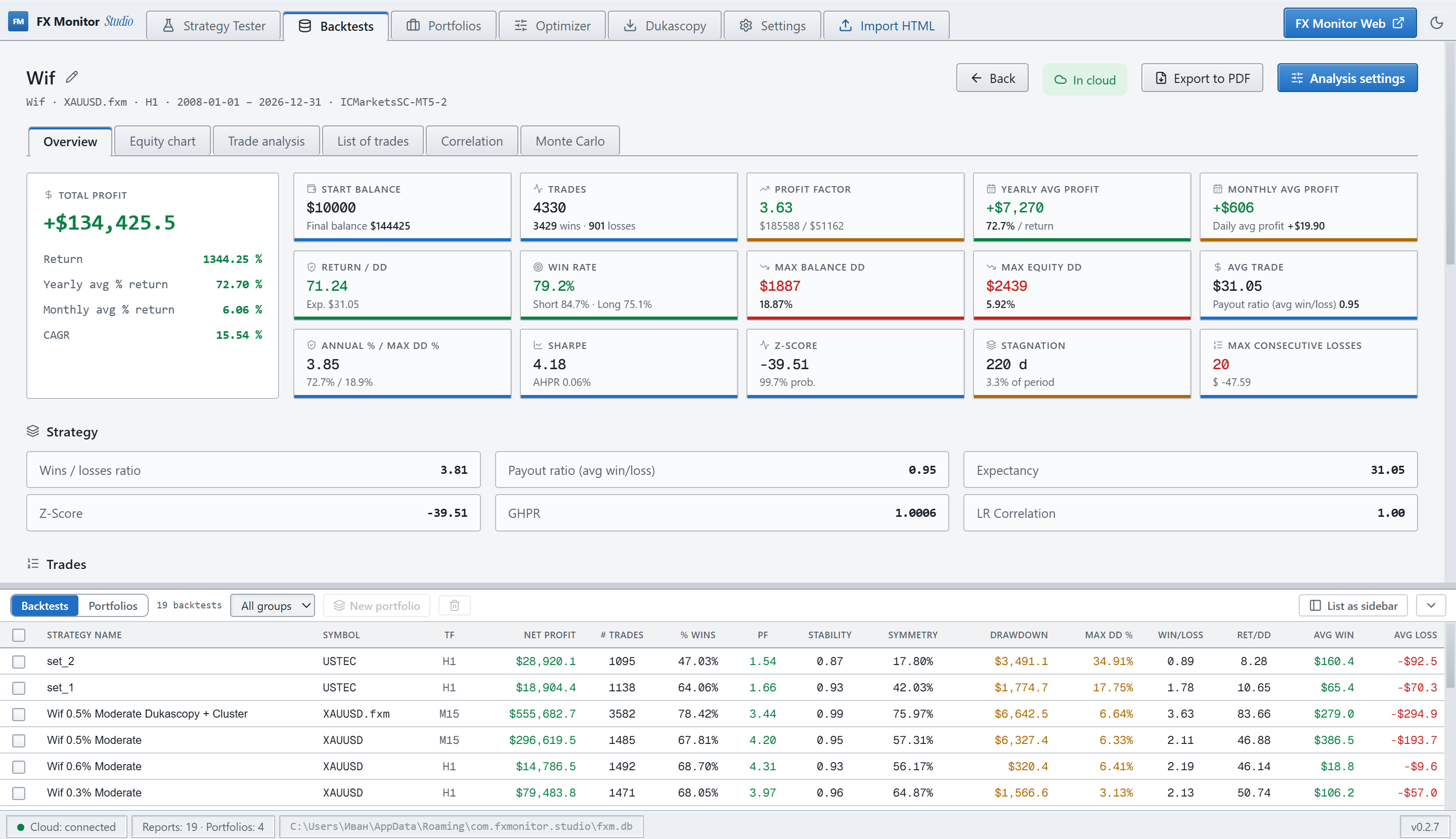
Equity- & Drawdown-Kurven, Profit Factor, Erwartungswert, Z-Score, Sharpe, Stagnation, Gewinn-/Verlustserien — das volle Quant-Bild.

Multi-Backtest-Portfolios

Strategien mit Gewichtungen kombinieren, aggregierte Equity, Korrelation und Risiko sehen — als würden sie auf einem Konto handeln.

Portfolio-Optimizer

Teilmengen und Gewichtungen gegen ein Ziel durchsuchen — max. Rendite, min. Drawdown, min. Korrelation — und Berichte nach Symbol oder Kommentar aufteilen.

Monte-Carlo-Simulation

Robustheit im Stresstest: Ruinwahrscheinlichkeit, Drawdown-Verteilung, Chancen auf das Zielguthaben über Tausende randomisierter Durchläufe.

Strategie vs. Live-Divergenz

M1-Equity-Rekonstruktion und Analyse auf Trade-Ebene zeigen, wie sich ein Backtest gegenüber realer Ausführung verhalten würde.

FX Monitor Cloud-Sync

Backtests und Portfolios in Ihr Konto hochladen und auf jedem Rechner abrufen. Ihre Recherche begleitet Sie überall.

Kurshistorie

Jahre echter Historie, eingebaut in Ihre Backtests

Die Qualität eines Backtests hängt direkt von der Tiefe und Qualität der zugrunde liegenden Historie ab. Broker liefern meist nur einen kurzen, geglätteten Ausschnitt, der für einen ehrlichen Test nicht ausreicht. Die Dukascopy-Historie reicht bei den meisten Symbolen bis Mai 2003 zurück — so sehen Sie, wie sich eine Strategie langfristig und in Krisenphasen verhält, und nicht nur im schmalen Fenster Ihres Brokers.

  • Vollständiger Dukascopy-Katalog — Forex, Metalle, Indizes, Rohstoffe, Krypto und Aktien
  • M1-Bars oder echte Ticks über jeden Zeitraum, zurück bis 2003
  • Inkrementeller Download — lädt nur, was fehlt, nie wieder den gesamten Datensatz
  • Integritätsprüfung — erkennt beschädigte Dateien und lädt sie automatisch neu
  • Export als CSV oder direkt in MT5 als backtest-fertiges Custom-Symbol — hohe Modellierungsqualität
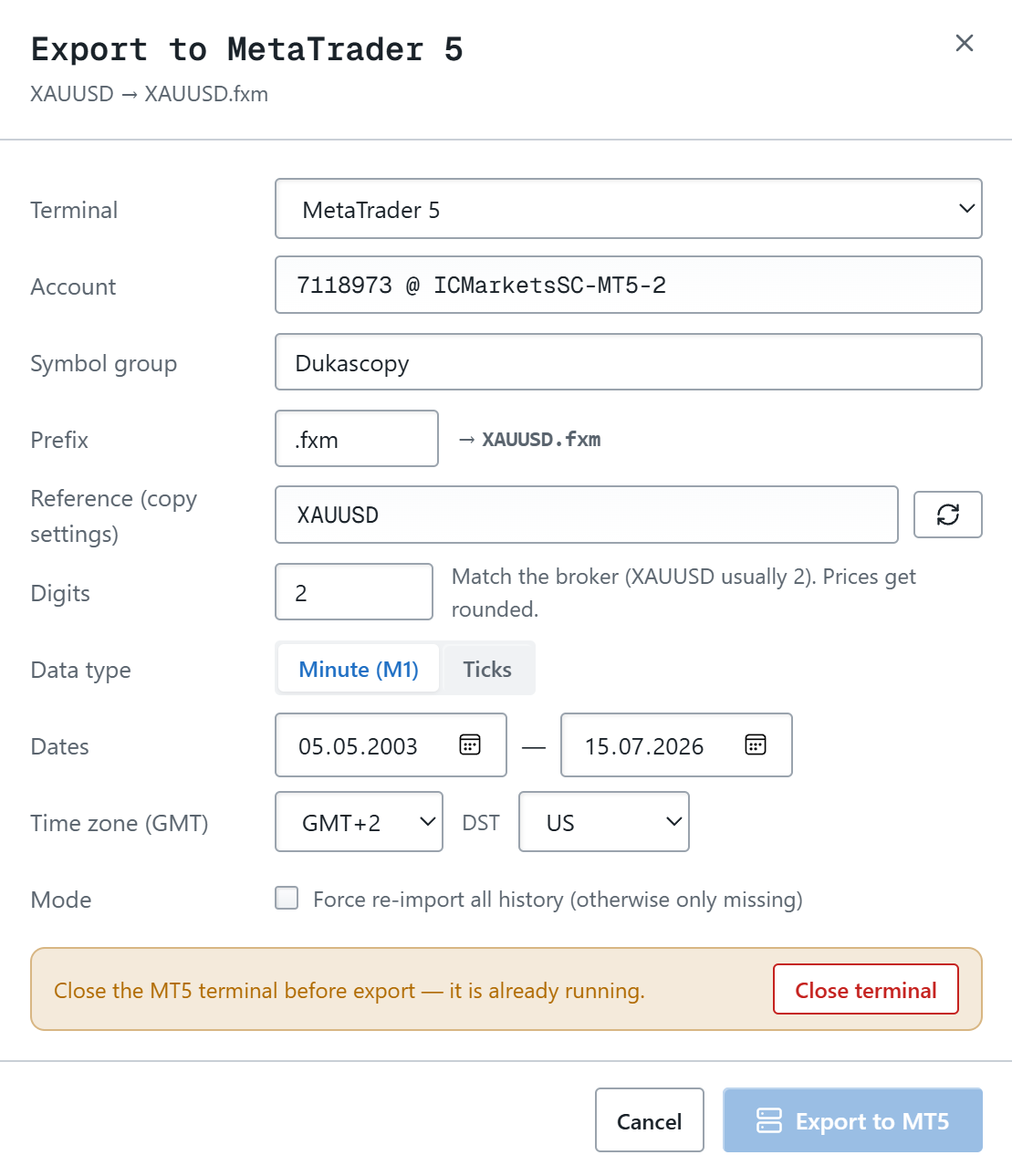
Dukascopy History Loader
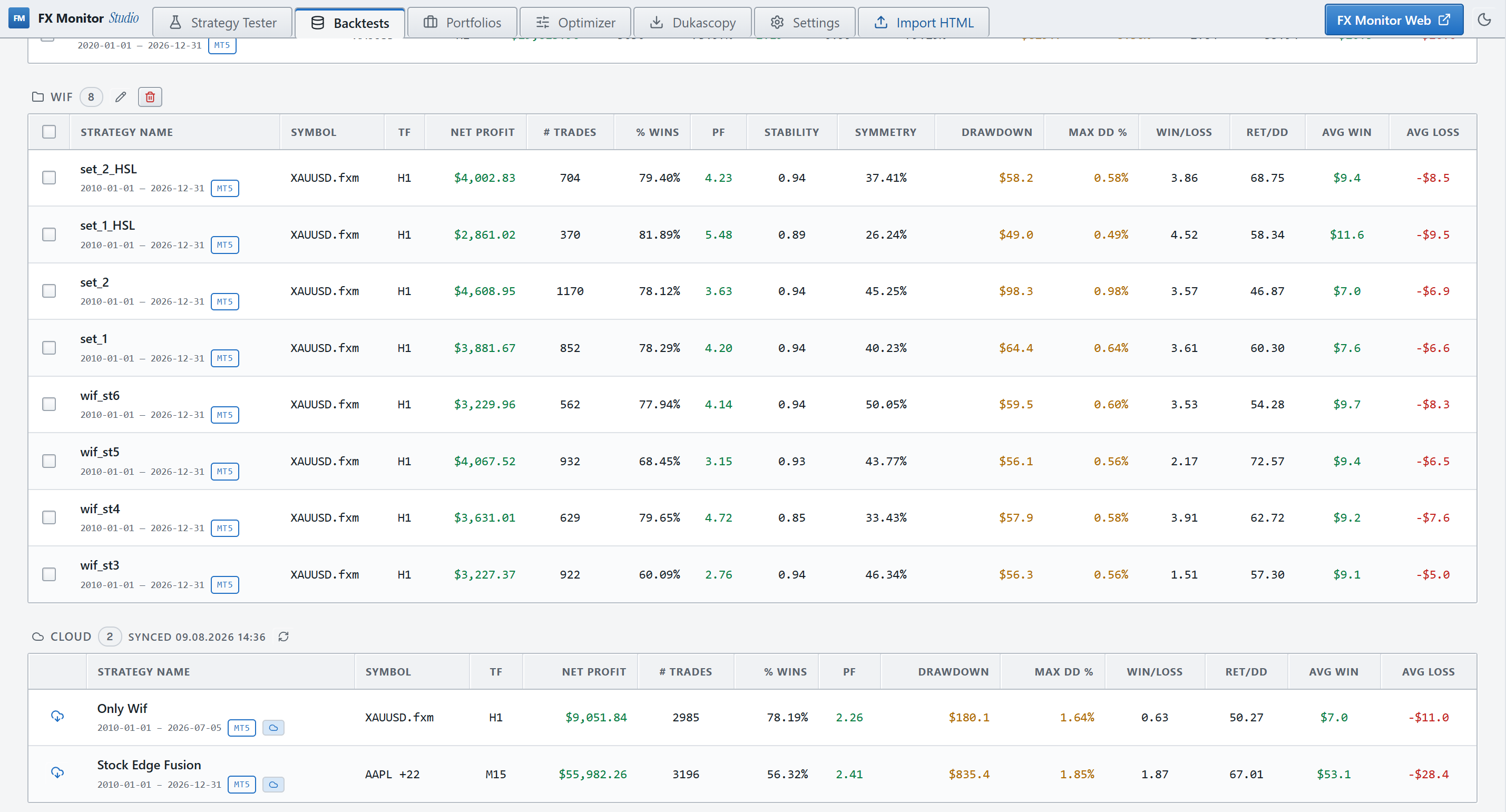
Cloud-Sync

Ihre Recherche, überall.

Verbinden Sie Studio per API-Schlüssel mit Ihrem FX Monitor Konto. Laden Sie einen Backtest vom Bürorechner hoch und öffnen Sie ihn auf dem Laptop — samt Analysen und Portfolios.

  • Upload von Backtests und Portfolios per Klick
  • Die gesamte Bibliothek bei einer Neuinstallation importieren
  • Komponenten-Portfolios bleiben in der Cloud numerisch exakt
  • Tarifabhängige Limits, live in den Einstellungen sichtbar
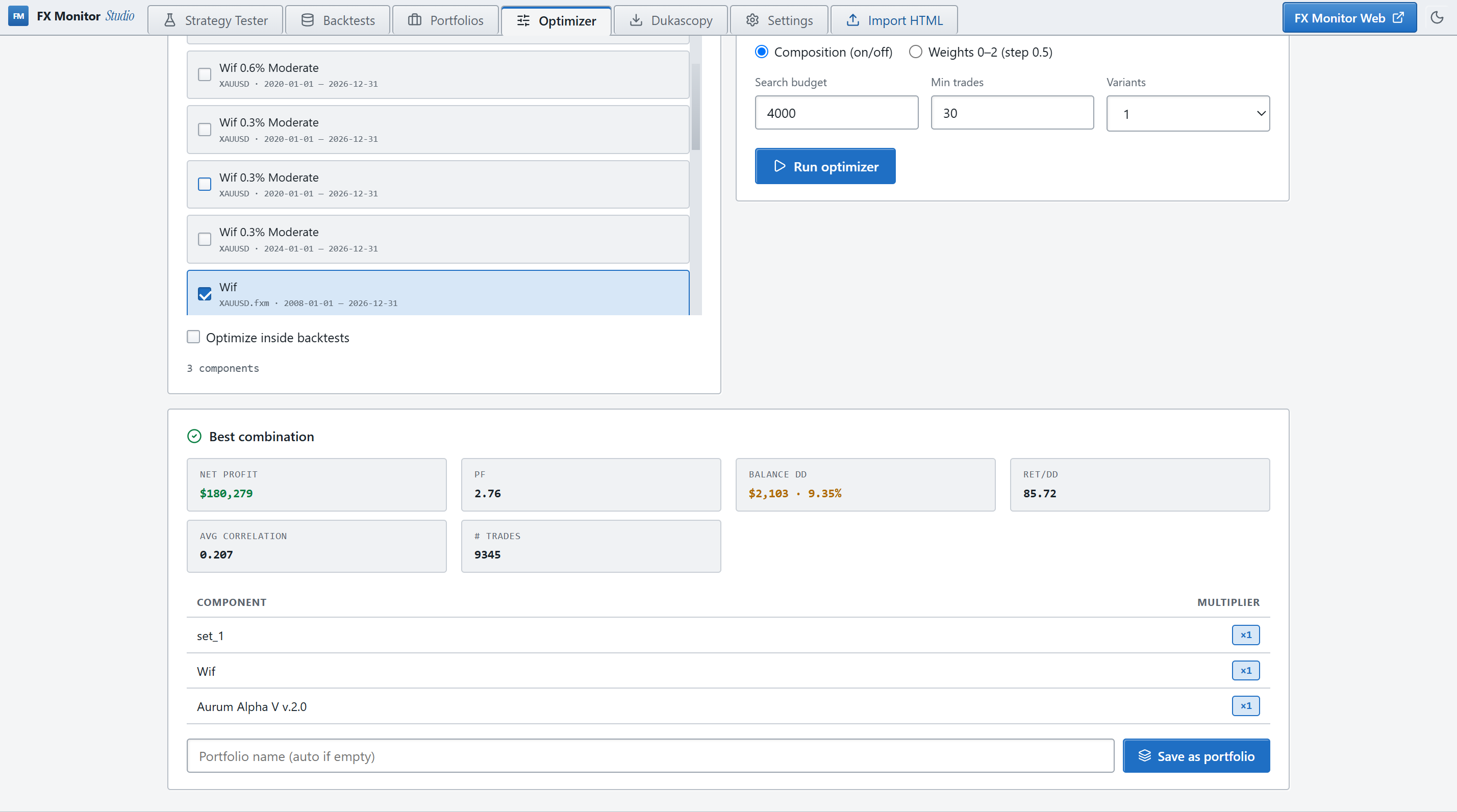
Portfolio-Optimizer

Finden Sie den besten Mix.

Geben Sie Ihre Strategien ein und lassen Sie den Optimizer Kombinationen und Gewichtungen auf Ihr Ziel hin durchsuchen — und speichern Sie das Ergebnis per Klick als Portfolio.

  • Ziele: max. Gewinn, min. DD, max. PF, max. Rendite/DD, min. Korrelation
  • Bericht nach Symbol oder Trade-Kommentar in Komponenten aufteilen
  • Teilmengen- & Raster-Gewichtungssuche mit Live-Best-Vorschau
  • Out-of-Sample-Deep-Split für ehrliche Validierung
Changelog

Was ist neu.

v0.2.6 Neueste 2026-08-02 21:48:40
- Clooud sync optimization;
v0.2.5 2026-07-25 13:31:16
- UI fixes;
v0.2.4 2026-06-29 17:31:28
- UI fixes; - Portfolio Correlation bug-fix;
v0.2.3 2026-06-26 12:46:49
- Multi-terminal setup bug fix;
v0.2.2 2026-06-26 01:37:44
- Symbol selector bug fix — fixed symbol export for brokers with non-standard symbols: launches on a real symbol with manual entry fallback, remembers it per broker-server, and caches the list per account login (survives account switching and restarts).
v0.2.1 2026-06-25 16:05:41
- Launcher: removed the backtest time limit — tick-based tests can now run for hours without a false timeout. - Equity reconstruction from Dukascopy quotes (M1 bars and ticks), available in backtests, portfolios, and the optimizer.
v0.2.0 2026-06-25 13:10:15
Dukascopy data loader — a built-in tool to download historical market data directly from Dukascopy and feed it into MetaTrader 5: - Browse and search the full Dukascopy instrument catalog (Forex, Metals, Indices, Commodities, Crypto, Stocks), filtered by group. - Download M1 bars or real tick data for any symbol and date range, with multi-threaded downloading and a live progress queue showing the current date being fetched. - Incremental download — re-running a download only fetches missing data, skipping files already on disk. - Export to CSV — save M1 or tick history as MetaTrader-compatible CSV with configurable time zone (GMT offset + DST) and date range. - Export to MetaTrader 5 — create a custom symbol directly in your terminal from downloaded data: - Classic theme — an alternative visual theme with tighter, more compact styling, selectable in settings.
v0.1.4 2026-06-23 15:12:31
Backtest list now in two layouts: sidebar or bottom panel Bottom panel: full metrics table, sortable on every column, compact rows, checkboxes, bulk delete and portfolio creation "Import HTML" button in the top menu — import from any section, jumps to Backtests Strategy Tester page now shows a "Tester backtests" list of runs
v0.1.3 2026-06-18 11:24:35
FX Monitor Studio 0.1.3 Improvements: - Added leverage and execution delay settings to the tester. - When importing an HTML report, the backtest name now comes from the file name instead of the EA name. Fixes: - Fixed console windows flickering during backtests: they no longer pop up and steal focus, so you can keep working in the background.
v0.1.2 2026-06-14 15:52:19
FX Monitor Studio 0.1.2 New: - Claude Code integration: the fxm-studio command gives the agent access to your backtest library — analyze, break strategies apart, build and optimize portfolios. Results import into Studio automatically, with your confirmation. - Backtest breakdown by strategy and symbol: see each component's contribution and risk, and save a cleaned backtest with losing strategies removed. - 10 interface languages: added Ukrainian, German, French, Spanish, Portuguese, Italian, Malay, Indonesian. Improvements: - The app no longer behaves like a browser: removed stray context menu and hotkeys. Fixes: - Fixed duplicate report when the tester loaded history slowly.
v0.1.1 2026-06-13 13:46:44
FX Monitor Studio 0.1.1 — first public release Desktop analyzer and MT5 tester launcher: - Run MT5 backtests directly from the app - Import MT4/MT5 HTML reports - Analytics: equity, drawdowns, Monte Carlo, strategy metrics - Multi-backtest portfolios with multipliers - Optimizer and component-based portfolio builder - Sync backtests and portfolios with FX Monitor Cloud - Dark/light themes, Multi-Language UI

Holen Sie sich Studio.

Kostenlos mit Ihrem FX Monitor Konto. Herunterladen, API-Schlüssel einfügen, fertig.

↓ Für Windows herunterladen
v0.2.6 · Windows 10/11 · x64 Auto-Updates integriert