FX Monitor Studio now includes a built-in Dukascopy History Loader — a tool that downloads years of historical market data and turns it into ready-to-use custom symbols in MetaTrader 5, without leaving the app. It solves one of the biggest pain points for any algo trader: access to deep, quality history for testing Expert Advisors.
Why this matters
The quality of a backtest depends directly on the quality and depth of the history it runs on. The problem is that brokers usually provide limited history — a short and often "polished" slice that isn't enough for an honest test of a strategy. As a result, a trader sees an EA's behavior only over a narrow window and can't assess how it would perform over the long run, during crisis periods, or in unusual market conditions.
The Dukascopy History Loader removes that limitation. Dukascopy history for most symbols is available from May 2003, giving you the real picture of how a strategy performs over periods that often stay out of view.
Download what you need
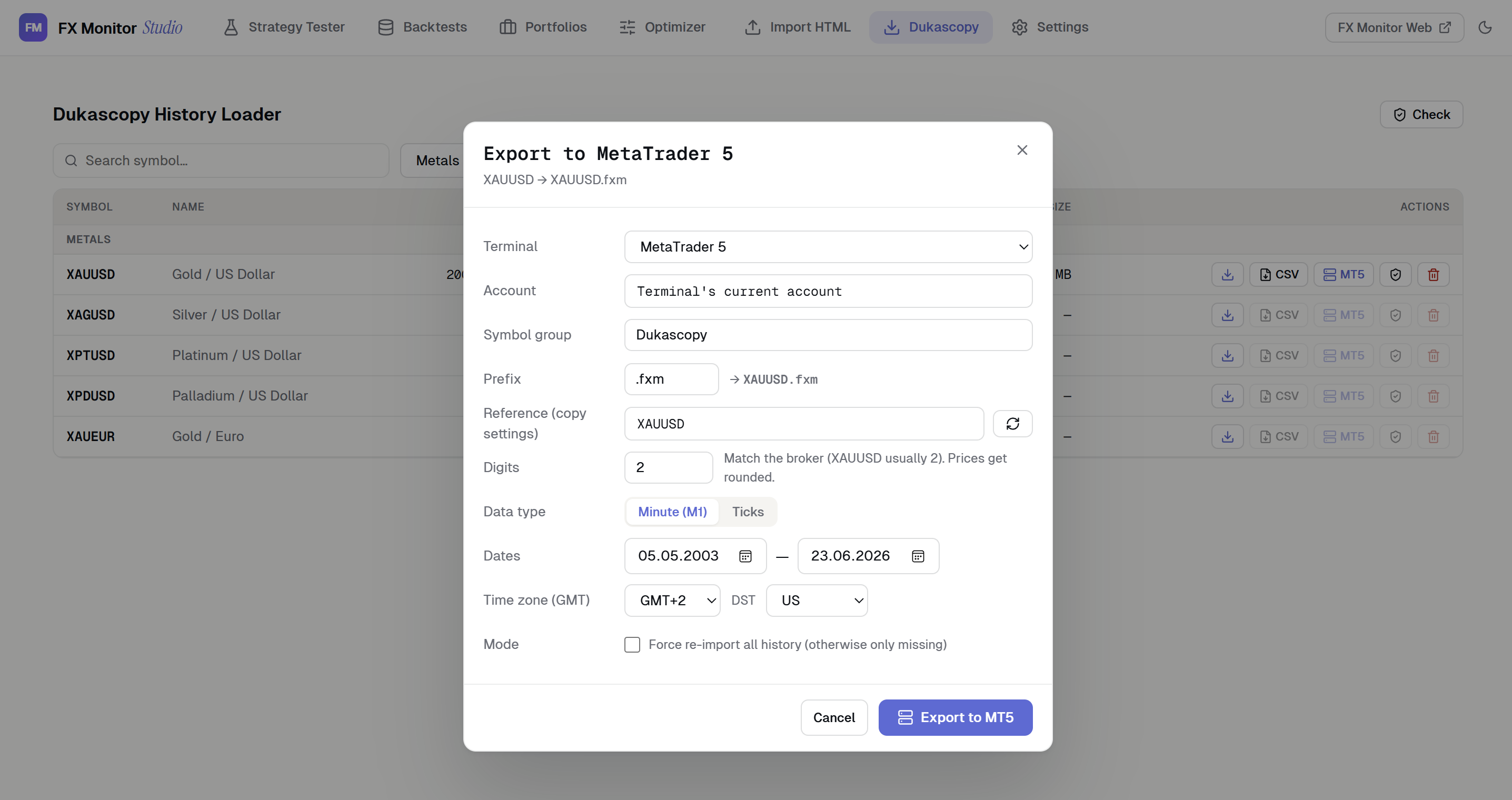
The Loader opens the full Dukascopy instrument catalog with search and grouping: Forex, Metals, Indices, Commodities, Crypto and Stocks. For any symbol you can download either M1 bars or real tick data over any date range, going back as far as 2003. Downloads run multi-threaded, and a live progress queue shows exactly which date is being fetched at any moment.
Smart incremental downloading
Re-running a download fetches only the missing data — already-downloaded data is skipped, so topping up your history is fast. If you downloaded data a year ago and only need the latest weeks, the Loader fills the gap instead of re-downloading the entire dataset.
Built-in integrity check
A dedicated Check function validates every cached file individually. Corrupted files — from interrupted downloads or bad chunks, for example — are detected, removed, and automatically re-queued for download. You can run the check across your whole cache or on a single symbol.
Flexible export
Data can be exported in two ways.
CSV — MetaTrader-compatible files with a configurable GMT offset, DST handling, and a selectable date range.
Direct to MetaTrader 5 — create a custom symbol right in your terminal. You choose a reference symbol to copy the broker's contract settings, set the symbol group, prefix and digits, while the export period is selected independently for bars and ticks. Incremental mode adds only the missing history, while Force re-import performs a clean full rebuild.
Backtest-ready quality
Custom symbols are built so that MetaTrader's Strategy Tester reconstructs accurate M1 history from the downloaded data, delivering high modeling quality. This gives you reliable backtests on instruments and history depth your broker may not provide. After export, your broker symbol list refreshes automatically, so the new symbol is ready to use right away.
Cache management
The Loader shows how much data you've stored, lets you clear individual symbols or wipe the whole cache, and remembers your preferences between sessions.
Availability
The Dukascopy History Loader is available completely free, regardless of your subscription plan. The section is built into FX Monitor Studio — a free desktop application for Windows 10/11 (x64).
👉 Learn more about FX Monitor Studio